Leave Your Message

What Is a Transparent Car Display Screen?

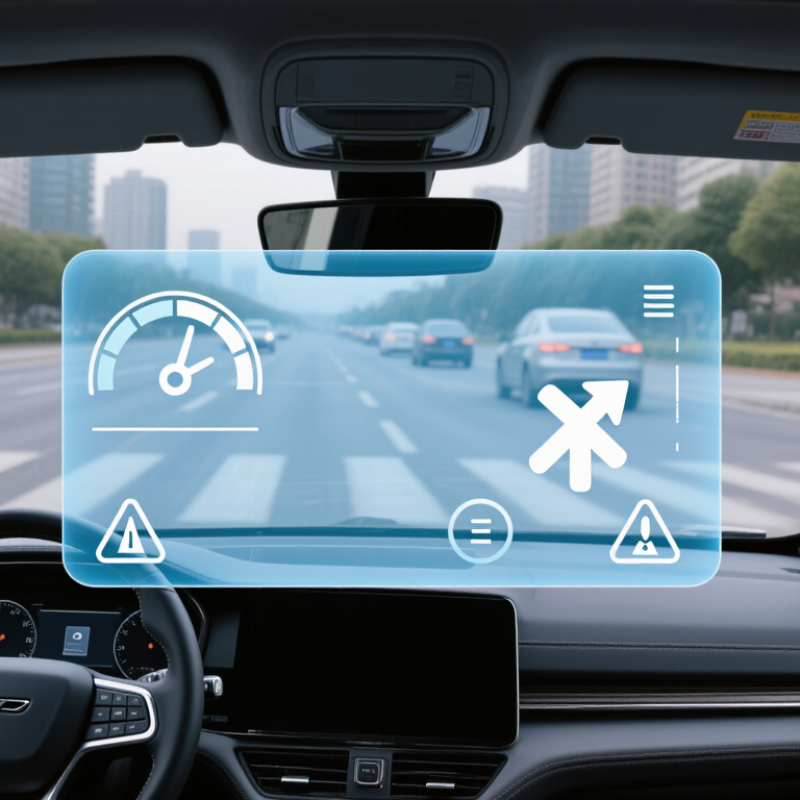
A Transparent Car Display Screen places digital information within a driver’s forward view, often on the windshield or a dedicated transparent panel. Depending on the design, it may use a transparent display layer or project images onto a surface. The result can show speed, navigation arrows, or warnings near the road ahead. A turn instruction might appear beside a street sign rather than on a separate dashboard screen. Small details matter.

The technology aims to reduce repeated glances away from the road, but it does not make driving effortless. Bright sunlight, reflections, display contrast, and viewing angles can affect readability. The image also needs careful positioning, so it does not obscure important parts of the driver’s view. Not every system displays the same information, and some vehicles use a projection-based head-up display instead of a transparent screen. The distinction is easy to miss.

This guide explains how transparent car displays work, where they are used, and what drivers should consider. It also looks at practical limits, including visibility at night and the risk of presenting too much information. Clear, restrained graphics are useful. More graphics are not always better. A display may look impressive in a showroom, yet feel distracting on a busy road. That gap deserves honest attention when evaluating the technology.
What Is a Transparent Car Display Screen?

Definition and Core Components of a Transparent Car Display Screen

A transparent car display screen presents useful information while allowing the driver to see the road through or beyond the display area. It may use a transparent panel built into a vehicle surface, or a projection system that places images on a clear combiner or windshield. These approaches are related, but they are not identical. That distinction matters.

The core components usually include a display layer, an optical surface, a control unit, and data inputs. The display layer creates text or graphics; the optical surface helps position the image within the driver’s view. A control unit processes information from vehicle systems, while sensors or navigation inputs provide details such as speed, warnings, or directions. In a projection-based design, a light source and focusing optics are also needed. Components vary by vehicle and display type.

Imagine a speed reading hovering near the lower edge of the windshield, visible without looking down at the instrument cluster. The image must remain legible in changing daylight, yet avoid blocking important road details. Brightness, contrast, viewing angle, and heat can all affect performance. Transparent does not mean invisible. Reflections may appear, and small text can be difficult to read. Even a carefully designed display can feel distracting if its information is poorly placed. That trade-off deserves more attention.

What Is a Transparent Car Display Screen?

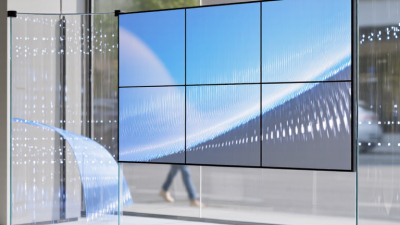
A transparent car display screen combines a see-through optical path with display and control layers, allowing information to appear while the driver can still see the road.

How to read this chart: The bars show illustrative visible-light transmittance values for individual optical layers—not the finished screen. Actual values vary with materials, thickness, wavelength, and display design. Core components include the transparent substrate, conductive layer, display layer, and optical bonding layer.

Display Types: Windshield HUDs, Transparent OLEDs, and See-Through LCDs

What Is a Transparent Car Display Screen?

A transparent car display screen lets drivers see information while retaining a view of the road. Windshield head-up displays, or HUDs, project symbols onto the glass. The image appears ahead of the driver, but the windshield itself is not an electronic screen. Bright sunlight, double images, and viewing position can affect readability. Less eye travel, not zero distraction.

Transparent OLED panels create images with self-emitting pixels, so they do not need a separate backlight. Their open areas can reveal objects behind the panel, though contrast may fade against a bright background. See-through LCDs work differently: liquid crystals control light from a separate source. Their image can look washed out, and extra lighting adds design complexity. The distinction matters. A clear panel alone does not guarantee legible information.

For HUDs, SAE J1757/1 sets out optical measurement methods, helping engineers assess image quality consistently. NHTSA’s visual-manual distraction guidance uses two seconds as a benchmark for an individual off-road glance and twelve seconds cumulatively across a task. Those figures are not a guarantee that any display is safe; they show why brief, glanceable information matters. A tiny arrow may be easier to read than a crowded map, even when both appear transparent. In practice, sunlight, reflections, and driver height still complicate the ideal design.

Industry Benchmarks: Up to 10,000 cd/m² HUD Brightness and ~40% OLED Transparency

A transparent car display places graphics over a view through the glass, helping drivers see speed, navigation, or warnings without looking down. Two figures shape the design challenge: HUD brightness can reach 10,000 cd/m², while transparent OLED panels may offer about 40% transparency. These are upper-end industry benchmarks, not guaranteed performance in every vehicle.

The brightness target matters in direct sun. A pale navigation arrow projected across a bright road can disappear if the image lacks contrast. SAE J1757/1 provides a framework for measuring automotive display optical performance; it does not set a universal 10,000 cd/m² requirement. For OLED, roughly 40% transparency leaves visible structure and can soften the scene behind the screen. That trade-off deserves honest testing, not just a striking specification.

Tips: Check legibility against daylight, shadows, and night driving. Ask whether brightness is measured at the display or perceived through the optical system. Small detail, big difference. Specifications can sound cleaner than real-world results. A slightly imperfect viewing angle may still matter.

How Optical Systems Place Virtual Images in the Driver’s Forward View

A transparent car display screen is usually an optical system, not a glowing image painted directly onto glass. A projector sends light toward a coated windshield area or a separate combiner. The glass reflects that light into the driver’s eyes, making symbols appear farther ahead than the dashboard. Carefully chosen focal distance can reduce repeated refocusing between nearby controls and distant traffic. The viewing zone matters: shift your head too far, and the image may dim, distort, or disappear.

Designers tune brightness, contrast, reflection angle, and the eye box—the space where the image remains visible. Windshield curvature can create ghost images, while sunlight can wash out pale graphics. NHTSA’s 2013 Visual-Manual Driver Distraction Guidelines recommend limiting individual off-road glances to two seconds and total glance time to twelve seconds for secondary tasks. Those figures are useful design targets, not proof that every display is distraction-free. A virtual image can feel intuitive, yet clutter still competes with the road.

Tips: Check the image from your normal driving posture, in bright daylight and at night. Keep essential guidance near the forward sightline, but question whether each extra icon earns its place.

What Is a Transparent Car Display Screen? — How Optical Systems Place Virtual Images in the Driver’s Forward View
System element What it is or does Effect in the driver’s view Important design consideration
Head-up display (HUD) A display system that projects driving information into the driver’s forward field of view, typically using a light source, image-forming optics, and a reflecting surface. Information appears ahead of the driver rather than only on a dashboard screen. The apparent image position depends on the optical design; the image is not a physical object on the road.
Virtual image An image formed when reflected light rays appear to come from a location beyond the reflecting surface. Displayed symbols can appear to sit at a perceived distance in front of the vehicle. Image distance and apparent depth vary by system. A virtual image cannot be viewed as a real object by placing a screen at its apparent location.
Image source A projector or display module generates the light and graphics that form the HUD image. Provides items such as speed, navigation prompts, or warning symbols. Brightness, contrast, resolution, and color depend on the display technology and operating conditions.
Optical path Mirrors, lenses, or other optical elements guide and shape light from the image source toward the reflecting surface. Determines the size, focus, position, and apparent depth of the displayed image. Careful alignment is needed to keep the image usable across the intended driver viewing positions.
Windshield combiner The windshield can reflect part of the projected light toward the driver while allowing much of the outside scene to remain visible. The reflected graphics appear overlaid on the driver’s view through the windshield. Windshield shape, coatings, and laminated glass construction affect reflection and image quality; some designs use a dedicated reflective layer.
Dedicated combiner A separate transparent or partially reflective panel can serve as the surface that redirects display light to the driver. Creates a visible display image without relying on the windshield as the primary reflecting surface. Its position and size influence the viewing area and how naturally the display sits in the forward view.
Eye box The range of eye positions from which the complete HUD image can be seen. Allows drivers of different heights or seating positions to view the display. Moving outside the designed eye box can cause part or all of the image to disappear.
Field of view The angular width and height of the image visible to the driver. A larger field of view can support a broader image or more prominent graphics. Field of view is limited by optical design, packaging space, and the size of the reflecting area.
Image focus and depth The optical system sets the apparent focus distance of the virtual image. A farther apparent image may reduce the need to refocus between the display and distant traffic. Focus distance is system-dependent, and drivers may still need to shift focus to nearby or distant objects.
Brightness and contrast Display output must remain distinguishable against changing daylight, shadows, and nighttime conditions. Helps keep symbols legible against the scene visible through the windshield. Automatic brightness adjustment can help, but sunlight, reflections, and the background scene can still affect readability.
Double images and ghosting Multiple reflections within the windshield or optical stack can create a faint secondary image. Can make text or symbols appear blurred or duplicated. Glass construction, reflective coatings, and optical alignment are used to manage unwanted reflections.
Transparent display versus HUD A transparent display refers broadly to a display surface that transmits light; a HUD uses optics to place a display image in the forward view. Both can preserve visibility of the scene behind or beyond the display, but they form images in different ways. A windshield HUD does not necessarily use a transparent screen embedded in the glass; it may project onto the windshield or a separate combiner.

Automotive Uses, Visibility Limits, and Driver-Safety Requirements

What Is a Transparent Car Display Screen?

Automotive Uses, Visibility Limits, and Driver-Safety Requirements

A transparent car display screen places digital graphics on a see-through panel, often near the windshield or dashboard. It can show speed, navigation arrows, warnings, or battery information while leaving part of the view visible. Some systems use a transparent display surface; others project images onto glass, so the terms are not interchangeable. That distinction matters when judging image sharpness and placement.

Visibility is conditional, not guaranteed. Not always. Bright sunlight can wash out pale graphics, while dark scenes may make reflections more noticeable. Tint, viewing angle, dirt, and polarized sunglasses can also change contrast. A graphic that looks crisp in a showroom may fade against snow, wet pavement, or a bright sky. The display should keep critical road areas unobstructed and present only information drivers can absorb quickly. Warnings need clear contrast, stable positioning, and restrained animation. In practice, the experience can feel less seamless than product diagrams suggest.

Tips: Set brightness for daylight and night separately, then check the screen from your normal seated position. Keep navigation cues brief; avoid reading dense text while moving. It varies. If glare, double images, or blocked sightlines persist, adjust or disable the feature and consult the vehicle manual.